DevOps Trends 2026: AI Automation, GitOps, CI/CD, DevSecOps and Platform Engineering
DevOps in 2026 is not only about faster deployments.
Teams now need safer automation, better CI/CD pipelines, stronger security checks, reliable observability, AI-assisted workflows, and repeatable platform standards.
If your team is still depending on manual deployments, unclear rollback steps, scattered secrets, and noisy alerts, 2026 is the right time to improve your DevOps process.
This guide explains the most important DevOps trends in 2026 and how software teams can use them in real projects.
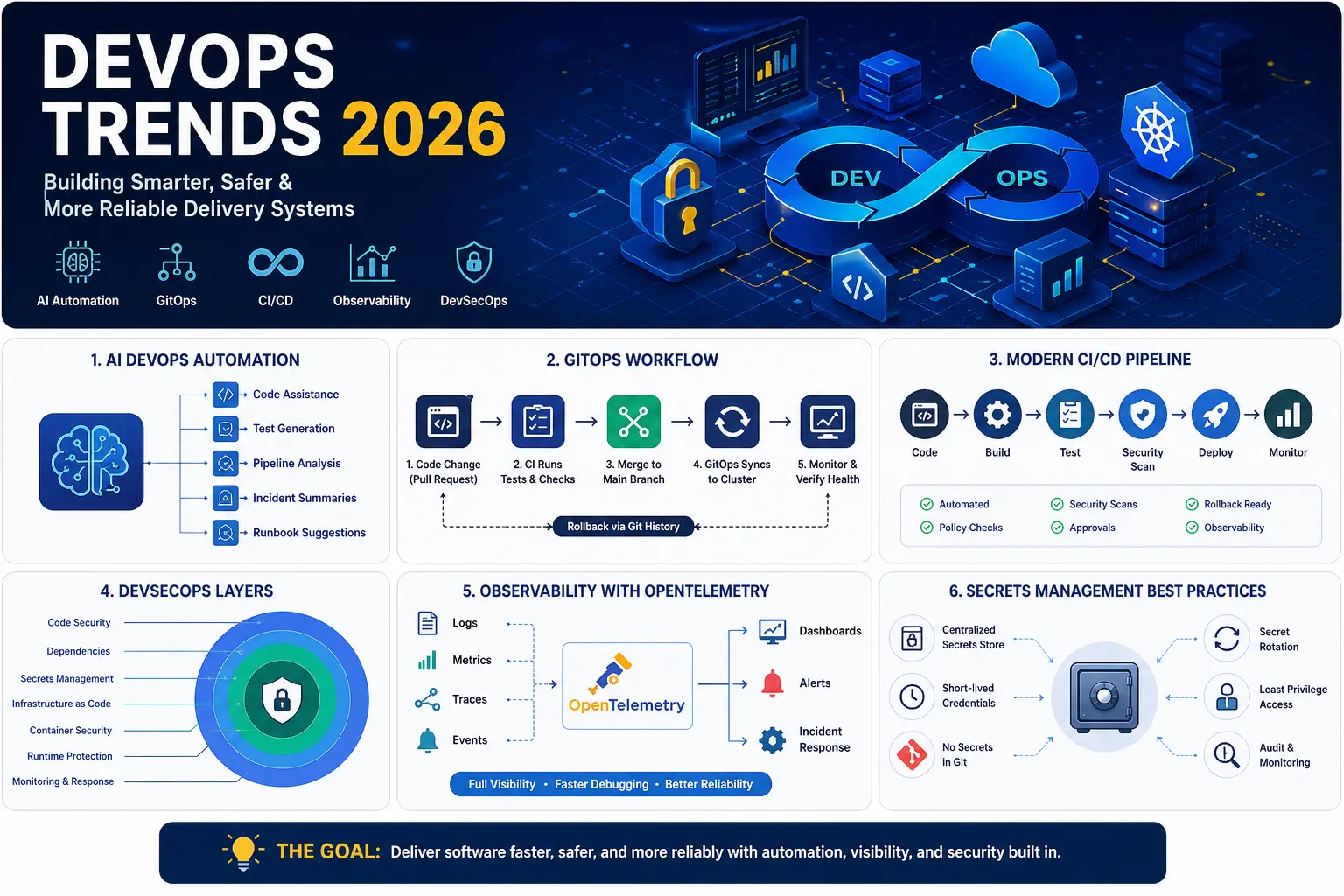
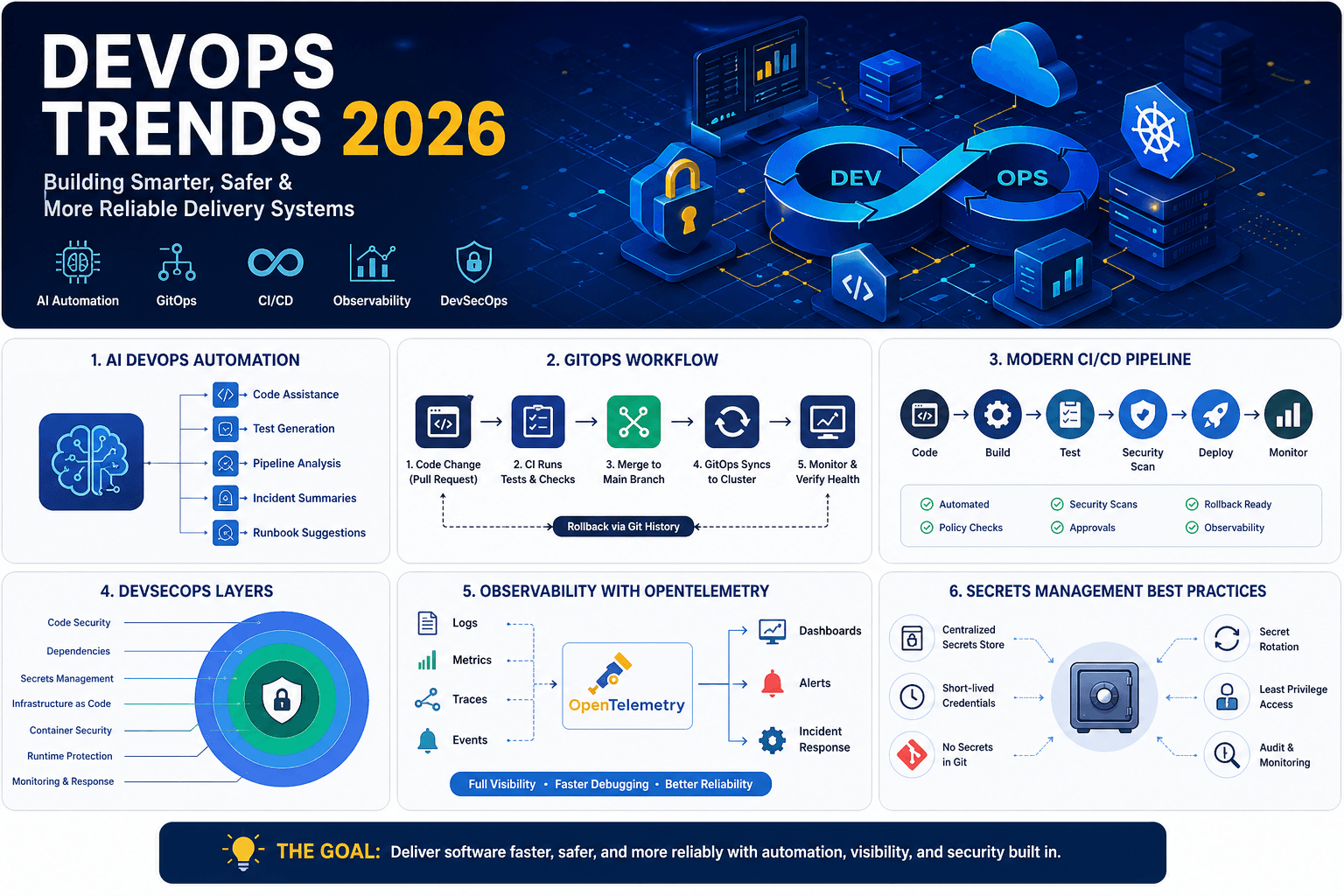
Image caption: Key DevOps trends for 2026 include AI-assisted automation, GitOps workflows, modern CI/CD pipelines, DevSecOps layers, OpenTelemetry observability, and safer secrets management.
Quick Answer: What Are the Top DevOps Trends in 2026?
The top DevOps trends in 2026 are:
- AI DevOps automation
- Platform engineering
- GitOps
- Policy-based CI/CD pipelines
- DevSecOps
- Software supply chain security
- Kubernetes for AI and cloud-native workloads
- OpenTelemetry-based observability
- Better secrets management
- Incident automation
- Cloud cost visibility
The main shift is clear: DevOps teams are moving from simple automation scripts to safer, measurable, and policy-driven software delivery systems.
Table of Contents
- Why DevOps Is Changing in 2026
- 1. AI DevOps Automation
- 2. Platform Engineering
- 3. GitOps
- 4. CI/CD Pipeline Trends
- 5. DevSecOps
- 6. Software Supply Chain Security
- 7. Kubernetes for AI and Cloud-Native Workloads
- 8. Observability with OpenTelemetry
- 9. Secrets Management
- 10. Incident Automation
- DevOps Trends 2026 Comparison Table
- DevOps Best Practices for 2026
- Common DevOps Mistakes
- DevOps 2026 Checklist
- Final Recommendation
- FAQs
Why DevOps Is Changing in 2026
DevOps teams are dealing with more complexity than before.
Modern teams often manage:
- Cloud infrastructure
- Kubernetes clusters
- CI/CD pipelines
- Container images
- Secrets
- Logs, metrics, and traces
- Security scans
- AI-assisted coding tools
- Compliance requirements
- Incident response
- Cloud cost control
This means DevOps is no longer just a deployment function.
A strong DevOps process now connects development, security, infrastructure, monitoring, release management, and business reliability.
For more DevOps resources, visit the DevOps & Automation section.
1. AI DevOps Automation
AI DevOps automation is one of the biggest DevOps trends in 2026.
AI can help DevOps teams reduce repetitive work and understand complex systems faster. But AI should support engineers, not replace human review for risky production actions.
Where AI Helps in DevOps
AI can help with:
- Explaining CI/CD pipeline failures
- Summarizing long logs
- Suggesting test cases
- Drafting runbooks
- Reviewing pull requests
- Detecting risky deployment patterns
- Creating incident summaries
- Finding common security issues
- Writing documentation for deployment workflows
Example: AI-Assisted Pipeline Debugging
A failed CI/CD job may produce thousands of log lines.
Instead of reading everything manually, AI can summarize:
Pipeline failed during dependency installation.
Likely cause: package version conflict between package-a and package-b.
Suggested fix: update package-b to version 2.4.1 or pin package-a to the previous working version.This saves time, but an engineer should still verify the fix before merging.
AI DevOps Best Practice
Use AI for:
- Suggestions
- Summaries
- Documentation drafts
- Test ideas
- Log analysis
- Runbook support
Avoid using AI for:
- Automatic production approval
- Unreviewed infrastructure changes
- Secret handling
- Compliance decisions
- Direct access to production systems
2. Platform Engineering
Platform engineering is becoming a practical way to reduce DevOps confusion.
Instead of every team creating its own deployment scripts, monitoring setup, secrets process, and cloud workflow, platform teams create reusable internal systems.
What Platform Engineering Provides
A good internal developer platform may include:
- Approved CI/CD templates
- Self-service environments
- Standard deployment workflows
- Kubernetes templates
- Logging and monitoring defaults
- Secrets management patterns
- Security guardrails
- Service ownership records
- Rollback workflows
- Cost visibility
Why Platform Engineering Matters
Without platform standards, every team solves the same problems differently.
That creates:
- More failed deployments
- More security gaps
- More cloud waste
- More onboarding problems
- More manual support requests
- More inconsistent production systems
Platform engineering helps developers ship faster while keeping important checks in place.
Example Platform Workflow
service_template:
language: nodejs
deployment: kubernetes
ci_cd:
tests: required
dependency_scan: required
secret_scan: required
container_scan: required
release:
strategy: canary
approval_required: true
rollback_enabled: true
observability:
logs: enabled
metrics: enabled
traces: enabledThis type of template gives teams a safe starting point.
3. GitOps
GitOps is a DevOps practice where Git becomes the source of truth for infrastructure and application deployment.
Instead of manually changing production systems, teams update Git repositories. A GitOps controller then applies the desired state to the environment.
Basic GitOps Flow
- Developer opens a pull request.
- CI runs tests and scans.
- Reviewer approves the change.
- Change is merged to the main branch.
- GitOps controller syncs the environment.
- Monitoring checks production health.
- Rollback happens through Git history if needed.
Why GitOps Is Useful in 2026
GitOps helps teams with:
- Clear audit history
- Easier rollback
- Better environment consistency
- Less manual production access
- Better Kubernetes management
- Reduced configuration drift
GitOps Example
apiVersion: apps/v1
kind: Deployment
metadata:
name: payment-service
spec:
replicas: 3
template:
spec:
containers:
- name: payment-service
image: registry.example.com/payment-service:v1.8.2When this file changes in Git, the deployment state can be updated through the GitOps process.
When GitOps Is a Good Fit
GitOps is useful when your team has:
- Kubernetes workloads
- Multiple environments
- Compliance requirements
- Frequent deployments
- Remote or distributed teams
- Infrastructure-as-code workflows
4. CI/CD Pipeline Trends
CI/CD pipelines in 2026 need more than build and deploy steps.
A modern pipeline should protect the software delivery process from broken code, insecure dependencies, leaked secrets, risky containers, and unapproved production changes.
Modern CI/CD Pipeline Stages
A strong CI/CD pipeline includes:
- Code checkout
- Dependency install
- Linting
- Unit tests
- Integration tests
- Secret scanning
- Dependency scanning
- Container scanning
- Infrastructure scanning
- Build artifact creation
- SBOM generation
- Approval gate
- Deployment
- Health check
- Rollback option
Example CI/CD Quality Gate
quality_gates:
tests:
unit: required
integration: required
security:
dependency_scan: required
secret_scan: required
container_scan: required
release:
production_approval: required
rollback_plan: required
observability:
health_check: requiredCI/CD Best Practice
Do not make pipelines complex just for the sake of process.
The goal is to make releases:
- Repeatable
- Secure
- Easy to debug
- Easy to rollback
- Easy to audit
For scheduled DevOps automation, use the Cron Expression Explainer to understand cron schedules before adding jobs to production.
5. DevSecOps
DevSecOps means adding security into the software delivery process instead of waiting until the end.
Security should be part of:
- Code review
- CI/CD
- Dependencies
- Containers
- Infrastructure
- Secrets
- Monitoring
- Incident response
DevSecOps Checks for 2026
| Area | What to Check |
|---|---|
| Source code | Secret leaks, unsafe patterns, branch protection |
| Dependencies | Known vulnerabilities, license issues, outdated packages |
| Containers | Base image risk, exposed ports, unnecessary packages |
| Infrastructure | Public access, weak IAM, insecure defaults |
| CI/CD | Runner permissions, protected variables, approval gates |
| Runtime | Suspicious behavior, failed auth, unusual traffic |
Example DevSecOps Failure Message
Bad message:
Security scan failed.Better message:
Dependency express@4.16.0 has a known vulnerability.
Fix: upgrade to express@4.18.2 or later.
Reason: package is included in production build.Good DevSecOps feedback should help developers fix the issue quickly.
For more security articles, visit the Cybersecurity section.
6. Software Supply Chain Security
Software supply chain security is now a key DevOps responsibility.
A production release depends on many things:
- Source code
- Third-party packages
- Build servers
- CI/CD runners
- Container registries
- Deployment credentials
- Artifacts
- Infrastructure configuration
If any part of that chain is weak, attackers may target it.
What DevOps Teams Should Protect
DevOps teams should know:
- Who changed the code
- Which packages were used
- Where the artifact was built
- Whether the artifact was modified
- Who approved the release
- Which environment received the deployment
Useful Supply Chain Controls
Add these controls to your pipeline:
- SBOM generation
- Artifact signing
- Dependency scanning
- Version pinning
- Build provenance
- Protected CI/CD runners
- Short-lived credentials
- Least privilege access
- Audit logs
Simple Rule
If your team cannot explain how a production artifact was built, who approved it, and where it came from, your release process needs stronger supply chain controls.
Use the Hash Generator when you need to understand hashes, checksums, and file integrity basics.
7. Kubernetes for AI and Cloud-Native Workloads
Kubernetes remains a major part of DevOps in 2026.
Many teams use Kubernetes for:
- Web applications
- APIs
- Background workers
- Microservices
- Batch jobs
- Internal platforms
- AI inference workloads
- Cloud-native infrastructure
Why Kubernetes Still Matters
Kubernetes helps teams manage:
- Scaling
- Scheduling
- Service discovery
- Rollouts
- Rollbacks
- Resource limits
- Workload isolation
- Container orchestration
Kubernetes DevOps Best Practices
For production Kubernetes, teams should define:
- Resource requests and limits
- Health checks
- Readiness checks
- Network policies
- Pod security settings
- Secrets management
- Logging standards
- Deployment strategy
- Rollback process
- Ownership labels
Example Kubernetes Health Checks
livenessProbe:
httpGet:
path: /health
port: 3000
initialDelaySeconds: 15
periodSeconds: 20
readinessProbe:
httpGet:
path: /ready
port: 3000
initialDelaySeconds: 5
periodSeconds: 10Health checks help Kubernetes understand whether a service is ready to receive traffic or needs recovery.
8. Observability with OpenTelemetry
Observability helps teams understand what is happening inside production systems.
Logs alone are not enough.
Modern observability usually includes:
- Logs
- Metrics
- Traces
- Events
- Dashboards
- Alerts
- Service maps
- Incident timelines
What Observability Should Answer
A useful observability setup should help answer:
- What changed before the incident?
- Which service is slow?
- Which request path failed?
- Which customer or tenant was affected?
- Did the latest deployment cause the issue?
- Is the issue in the app, database, network, or infrastructure?
- Should the team rollback, scale, or patch?
Common Observability Stack
| Need | Common Tools |
|---|---|
| Metrics | Prometheus, Grafana |
| Logs | Loki, Elasticsearch, OpenSearch |
| Traces | OpenTelemetry, Jaeger, Tempo |
| Alerts | Alertmanager, Grafana Alerting, PagerDuty |
| Incident review | Runbooks, postmortem templates, service ownership docs |
Better Logging Example
Weak log:
Error occurred.Useful log:
{
"level": "error",
"service": "payment-api",
"request_id": "req_92a1",
"user_id": "u_482",
"endpoint": "/api/payments",
"error": "payment_provider_timeout",
"duration_ms": 4200
}Structured logs make debugging much easier.
Use the Timestamp Converter when debugging logs across different time zones and systems.
9. Secrets Management
Secrets management is one of the most important DevOps security topics in 2026.
Secrets include:
- API keys
- Database passwords
- OAuth secrets
- SSH keys
- Cloud credentials
- Webhook tokens
- CI/CD tokens
- Encryption keys
Common Secrets Management Mistakes
Avoid these mistakes:
- Storing secrets in Git
- Sharing
.envfiles in chat - Using the same secret in every environment
- Keeping long-lived tokens
- Printing secrets in logs
- Giving broad access to CI/CD runners
- Forgetting to rotate credentials
- Using production secrets in local development
Better Secrets Management Practices
Use:
- Centralized secrets manager
- Short-lived credentials
- Secret rotation
- Least privilege access
- Separate secrets per environment
- CI/CD secret masking
- Access logs
- Emergency revocation process
Secrets Management Tools to Evaluate
| Tool | Good For |
|---|---|
| HashiCorp Vault | Advanced secrets management and dynamic credentials |
| AWS Secrets Manager | AWS-based teams |
| Azure Key Vault | Microsoft Azure environments |
| Google Secret Manager | Google Cloud workloads |
| Doppler | Developer-friendly secrets workflow |
| 1Password Secrets Automation | Teams already using 1Password |
| SOPS | Encrypted secrets in GitOps workflows |
| Sealed Secrets | Kubernetes secret encryption workflow |
Always verify current pricing, limits, and features from official vendor websites before choosing a tool.
10. Incident Automation
Incident automation helps teams respond faster when production breaks.
It does not remove engineers from incidents. It removes repetitive manual steps.
Useful Incident Automation Examples
Incident automation can:
- Group related alerts
- Notify the right on-call person
- Create an incident channel
- Attach a runbook
- Show recent deployments
- Link dashboards
- Suggest rollback options
- Generate incident timelines
- Draft postmortem notes
- Update status pages
Example Incident Flow
High error rate detected
→ Alert grouped with recent deployment
→ On-call engineer notified
→ Incident channel created
→ Runbook attached
→ Dashboard linked
→ Recent changes listed
→ Rollback option shown
→ Timeline saved for postmortemThis reduces stress during production issues.
DevOps Trends 2026 Comparison Table
| DevOps Trend | Why It Matters | Best First Step |
|---|---|---|
| AI DevOps automation | Helps teams analyze logs, tests, incidents, and pipelines faster | Use AI for summaries and test suggestions first |
| Platform engineering | Reduces repeated setup work across teams | Build one approved deployment template |
| GitOps | Improves audit history and rollback | Start with one Kubernetes environment |
| Policy-based CI/CD | Prevents risky releases | Add scans and approval gates |
| DevSecOps | Moves security into the delivery process | Add dependency and secret scanning |
| Supply chain security | Protects artifacts, packages, and builds | Generate SBOMs and sign artifacts |
| Kubernetes | Supports cloud-native and AI workloads | Standardize health checks and resource limits |
| OpenTelemetry observability | Improves visibility across services | Add traces to one important service |
| Secrets management | Reduces credential leak risk | Move secrets out of Git |
| Incident automation | Reduces manual incident work | Create runbooks for top alerts |
| Cloud cost control | Helps reduce waste | Track cost by service and environment |
DevOps Best Practices for 2026
1. Start With One Reliable Pipeline
Do not try to rebuild everything at once.
Start with one important service and improve its pipeline:
- Build
- Test
- Scan
- Package
- Approve
- Deploy
- Monitor
- Rollback
After that, turn the process into a reusable template.
2. Add Security Before Production
Security checks should run before production deployment.
Start with:
- Secret scanning
- Dependency scanning
- Container scanning
- Infrastructure-as-code scanning
- Branch protection
- Required reviews
3. Use Git as the Change Record
Use Git for:
- Application code
- Infrastructure code
- Deployment configuration
- Policy files
- Runbooks
- Environment templates
This makes changes easier to review and audit.
4. Keep Pipelines Easy to Understand
A CI/CD pipeline should be readable.
If only one person understands the pipeline, it is a risk.
Document:
- What each stage does
- What blocks deployment
- How rollback works
- Who approves production changes
- Where logs and artifacts are stored
5. Improve Observability Before Scaling
Before adding more services, make sure your existing services are observable.
Each production service should have:
- Logs
- Metrics
- Traces
- Alerts
- Dashboard
- Runbook
- Owner
6. Treat AI as an Assistant
AI can help your team move faster, but it should not bypass reviews, tests, approvals, or security checks.
Use AI where it reduces manual work without increasing production risk.
Common DevOps Mistakes
1. Adding AI to a Broken Process
AI will not fix unclear ownership, flaky tests, weak pipelines, or poor monitoring.
Fix the delivery process first.
2. Treating Platform Engineering as Only a Tool
Platform engineering is not just a portal.
It is a way to give developers safe, repeatable paths for common work.
3. Ignoring Secrets Until a Leak Happens
Secrets should be managed early.
Do not wait for a leaked API key or exposed cloud token.
4. Creating Too Many Alerts
Too many alerts create alert fatigue.
Alert only on issues that need human action.
5. Skipping Rollback Testing
A rollback plan is not useful unless it has been tested.
6. Making CI/CD Too Complicated
Complex pipelines break trust.
Keep them simple, documented, and reliable.
DevOps 2026 Checklist
Use this checklist before improving your DevOps workflow.
CI/CD Checklist
- Build process is repeatable
- Unit tests run automatically
- Integration tests run before release
- Failed pipeline logs are easy to understand
- Production deployment needs approval
- Rollback process exists
- Rollback process is tested
Security Checklist
- Secrets are not stored in Git
- Dependencies are scanned
- Containers are scanned
- Infrastructure code is scanned
- Production credentials are protected
- Access follows least privilege
- Audit logs are available
Platform Engineering Checklist
- Teams have reusable deployment templates
- Service ownership is documented
- Common workflows are self-service
- Environments are consistent
- Security guardrails are built in
- Developers can follow clear golden paths
Observability Checklist
- Logs are structured
- Metrics are available
- Traces exist for critical services
- Alerts have runbooks
- Dashboards show useful signals
- Incidents include timelines
- Postmortems lead to action items
AI DevOps Checklist
- AI outputs are reviewed
- AI-generated code is tested
- AI actions are logged
- Production changes need human approval
- AI does not access secrets directly
- Teams understand AI limitations
Suggested DevOps Roadmap for Small Teams
If your team is small, use this simple roadmap.
Month 1: Stabilize CI/CD
- Fix flaky tests
- Add required reviews
- Add secret scanning
- Add dependency scanning
- Document deployment and rollback
Month 2: Improve Observability
- Add structured logs
- Create basic dashboards
- Add service health checks
- Define alert rules
- Create runbooks for common incidents
Month 3: Add Platform Standards
- Create one deployment template
- Standardize environment variables
- Move secrets to a secrets manager
- Add service ownership labels
- Create a simple release checklist
Month 4: Add AI Carefully
- Use AI to summarize logs
- Use AI to draft tests
- Use AI to draft incident timelines
- Keep approvals human-controlled
- Review AI outputs before use
Recommended Internal Links
Final Recommendation
The best DevOps improvement in 2026 is to standardize the path from code to production.
Start with one service.
Build a reliable pipeline with tests, security checks, approvals, observability, and rollback. Then turn that workflow into a reusable template for other teams.
After that, add AI where it saves real time: pipeline failure summaries, incident timelines, test suggestions, deployment risk checks, and runbook drafts.
Do not chase every new tool. Build a safer, clearer, and more repeatable delivery system.